In this part I will go into multi polygon objects and how we can apply texture to adjacent polygons.
This example consist of 2 panels with at an angle of 90 degrees. We want to apply our texture on it and I will show 3 different ways of doing it.
The file looks like this:
ModelBegin
surface .5 .3 0

ClumpBegin
   Vertex -.2  0  .2 uv 0 1 #1
   Vertex  .2  0  .2 uv 1 1 #2
   Vertex  .2  0 -.2 uv 2 1 #3

   Vertex -.2 .4  .2 uv 0 0 #4
   Vertex  .2 .4  .2 uv 1 0 #5
   Vertex  .2 .4 -.2 uv 2 0 #6

   color 1 1 0

   Texturemodes lit foreshorten

   Texture smile

   Quad 1 2 5 4
   Quad 2 3 6 5

ClumpEnd

ModelEnd
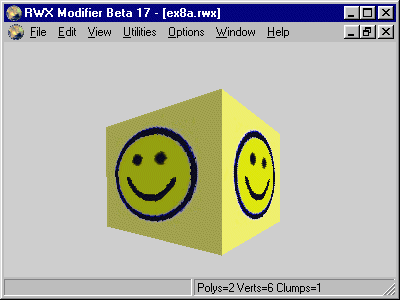
The model looks like this:
The vertex placement is illustrated here with the mapping information.
Note: the object has been rotated slightly clockwise on both this pictures to show both polygons.
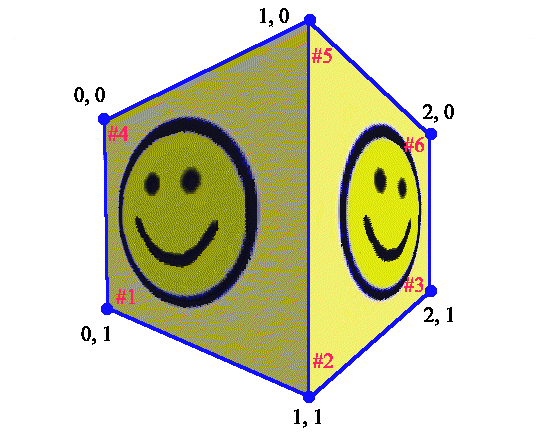
There are several things to explain here:
- With 2 Quad polygons you should expect that we would need 8 vertices but in this case 2 of them can be shared because we managed to plan the UV mapping that way.
- The left polygon is as in our first example. The polygon to the right is a continuation of the left one and we can apply the texture with a horizontal (U) offset of 1.
- The depth of the the object (the z axis) is in this instance is also the same as the depth of the right polygon. So how do we calculating the UV values at vertex 3 and 6? We can imagine that we twist the object to the right until it faces us. Now the depth becomes the width of the polygon and the calculation is as before but with the z values as basis for the U calculation.
Mapping polygons on a 3D model is like walking around a sculpture with a ruler for measuring distances and, and using that data to cut up pictures to fit and glue them on. The pictures can be stretched and twisted after your desires.
A advantage of this way of mapping around corners is that we can create a seamless effect, this can be illustrated we we map the left half of our texture on the left polygon and the right part on the right polygon. This will look like this.
ModelBegin
surface .5 .3 0

ClumpBegin
   Vertex -.2  0  .2 uv 0  1 #1
   Vertex  .2  0  .2 uv .5 1 #2
   Vertex  .2  0 -.2 uv 1  1 #3

   Vertex -.2 .4  .2 uv 0  0 #4
   Vertex  .2 .4  .2 uv .5 0 #5
   Vertex  .2 .4 -.2 uv 1  0 #6

   color 1 1 0

   Texturemodes lit foreshorten

   Texture smile

   Quad 1 2 5 4
   Quad 2 3 6 5

ClumpEnd

ModelEnd
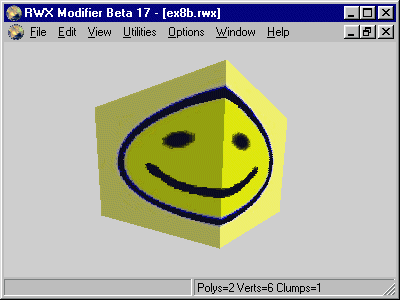
We are not forced to map from left to right, we can map any direction we like and we can also mirror images. To demonstrate that we let the origo (UV 0 0) for both polygons be at vertex #2 which is the the bottom front vertex. We also rotate the texture.
ModelBegin
surface .5 .3 0

ClumpBegin
   Vertex -.2  0  .2 uv 0 1 #1
   Vertex  .2  0  .2 uv 0 0 #2
   Vertex  .2  0 -.2 uv 0 1 #3

   Vertex -.2 .4  .2 uv 1 1 #4
   Vertex  .2 .4  .2 uv 1 0 #5
   Vertex  .2 .4 -.2 uv 1 1 #6

   color 1 1 0

   Texturemodes lit foreshorten

   Texture smile

   Quad 1 2 5 4
   Quad 2 3 6 5

ClumpEnd

ModelEnd
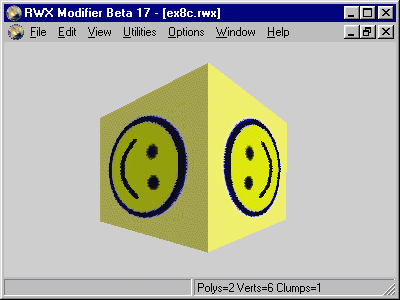
A illustration of the texturing:
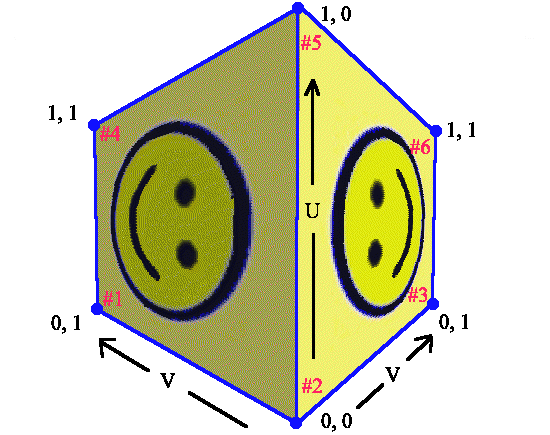
Because we rotated the texture 90 degrees the U component points vertically and V horizontally.
Note: mirroring a texture won't display it on the other side (the opposite side). It will be mirrored like here.
We will expand on example 8.1 with a third quad polygon. This polygon will be on top our other polygons and form a roof.
ModelBegin
surface .5 .3 0

ClumpBegin
   Vertex -.2  0  .2 uv 0 1 #1
   Vertex  .2  0  .2 uv 1 1 #2
   Vertex  .2  0 -.2 uv 2 1 #3

   Vertex -.2 .4  .2 uv 0 0 #4
   Vertex  .2 .4  .2 uv 1 0 #5
   Vertex  .2 .4 -.2 uv 2 0 #6

   Vertex  .2 .4 -.2 uv 1 1 #7
   Vertex -.2 .4 -.2 uv 0 1 #8

   color 1 1 0

   Texturemodes lit foreshorten

   Texture smile

   Quad 1 2 5 4
   Quad 2 3 6 5
   Quad 4 5 7 8

ClumpEnd

ModelEnd
The models looks like this slightly rotated clockwise and a tiled towards us:
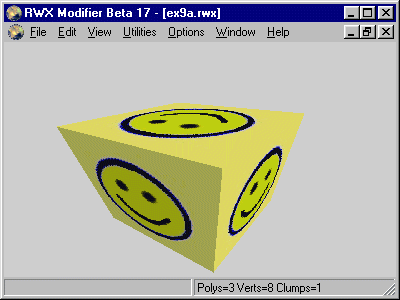
Looking at the rwx file you see 2 new vertices, #8 forms the new corner to the back and left. #7 is in x, y and z exactly the same as #6 but with different UV values. In this case we could not reuse #6.
A vertex can only have one set of UV values and we may need several vertices in the same point in space to ensure correct mapping.
A illustration of this:
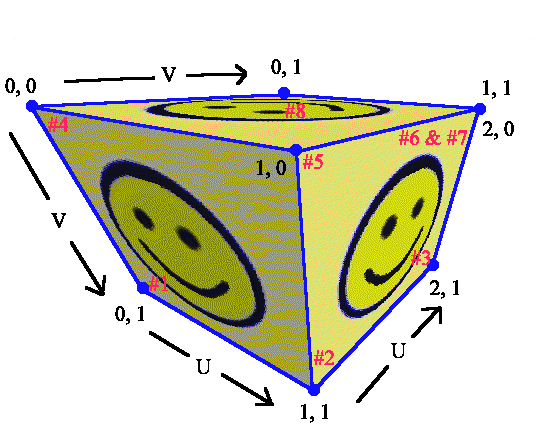
Note that vertex #6 and #7 is in the same place but has different UV values and is used at in different polygons.