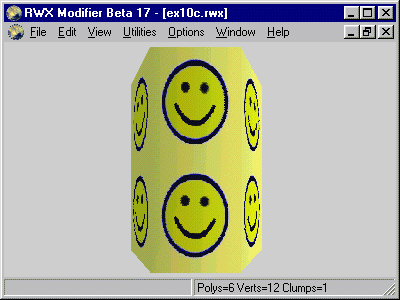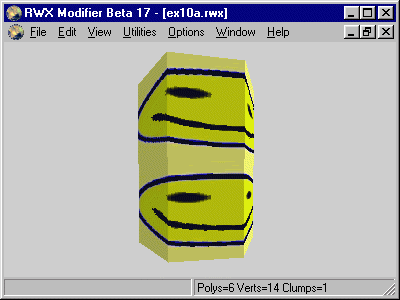
In this example we will apply texture to the outside of a 6-sided tube. There are several ways of doing this and I will show two very differant possible solutions.
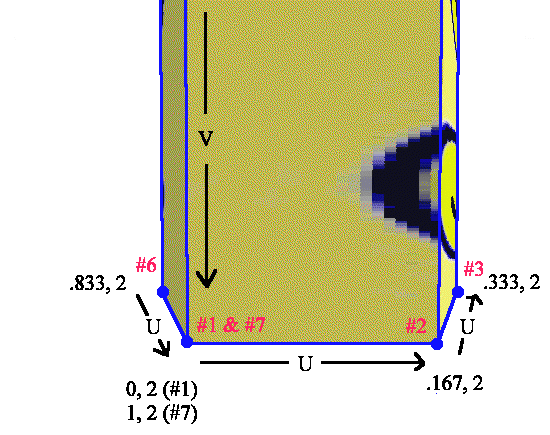
First we stretch the texture all the way around. Vertex 1 - 6 is the lower part and vertex #7 is vertex #1 with different UV values since vertex #1 is the starting point and can't be reused as ending point in this case. This pattern is repeated with vertex 8 - 14.
Since we wrap the texture once and the length of each side is approximately the same (not identical but close enough) we just divide 1 by 6 and get a increment of about .166. Note that I round off the numbers since we sometimes can forego total precision.
If you want a less stretched look in this example you can multiply the U values but I would recommend that the start and stop values here ended at integer values (or at the same fraction) for maximum seemless effect.
ModelBegin
surface .5 .3 0

ClumpBegin
   Vertex -.03  0  .05 UV 0    2 #1
   Vertex  .03  0  .05 UV .167 2 #2
   Vertex  .06  0  0   UV .333 2 #3
   Vertex  .03  0 -.05 UV .5   2 #4
   Vertex -.03  0 -.05 UV .667 2 #5
   Vertex -.06  0  0   UV .833 2 #6
   Vertex -.03  0  .05 UV 1    2 #7

   Vertex -.03 .2  .05 UV 0    0 #8
   Vertex  .03 .2  .05 UV .167 0 #9
   Vertex  .06 .2  0   UV .333 0 #10
   Vertex  .03 .2 -.05 UV .5   0 #11
   Vertex -.03 .2 -.05 UV .667 0 #12
   Vertex -.06 .2  0   UV .833 0 #13
   Vertex -.03 .2  .05 UV 1    0 #14

   color 1 1 0

   Texturemode lit foreshorten

   Texture smile

   Quad 1 2 9 8
   Quad 2 3 10 9
   Quad 3 4 11 10
   Quad 4 5 12 11
   Quad 5 6 13 12
   Quad 6 7 14 13

ClumpEnd
ModelEnd
A picture will only show part of this object:
The lower part is illustrated here:
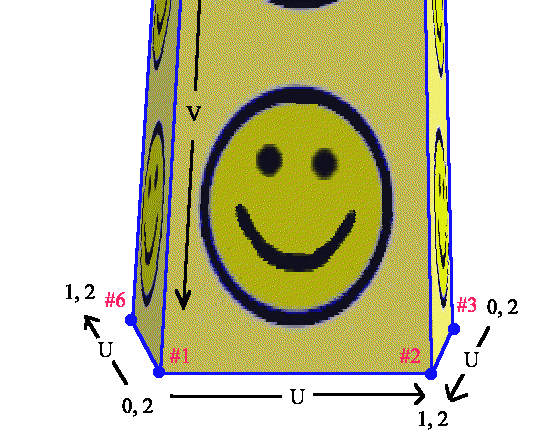
In the second example we will have a differant approach. For simplicity I will tile the texture once on every polygon in the U direction. What is done here is that at every second polygon the texture is mirrored. This can be done if the texture is suitable for it. A wood texture (with its non-parallell lines) will most probably not look good here.
ModelBegin
surface .5 .3 0

ClumpBegin
   Vertex -.03  0  .05 UV 0 2 #1
   Vertex  .03  0  .05 UV 1 2 #2
   Vertex  .06  0  0   UV 0 2 #3
   Vertex  .03  0 -.05 UV 1 2 #4
   Vertex -.03  0 -.05 UV 0 2 #5
   Vertex -.06  0  0   UV 1 2 #6

   Vertex -.03 .2  .05 UV 0 0 #7
   Vertex  .03 .2  .05 UV 1 0 #8
   Vertex  .06 .2  0   UV 0 0 #9
   Vertex  .03 .2 -.05 UV 1 0 #10
   Vertex -.03 .2 -.05 UV 0 0 #11
   Vertex -.06 .2  0   UV 1 0 #12

   color 1 1 0

   Texturemode lit foreshorten

   Texture smile

   Quad 1 2 8 7
   Quad 2 3 9 8
   Quad 3 4 10 9
   Quad 4 5 11 10
   Quad 5 6 12 11
   Quad 6 1 7 12

ClumpEnd
ModelEnd
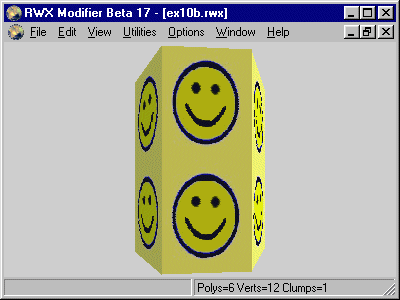
Again a illustration to explain how this is done. Note that in this case vertex #1 can be reused for the last polygon because we have a even number of sides.
In the beginning of this example I called this a tube but it hardly looks very round. That can be helped with the Lightsampling Vertex command. The default setting is Lightsampling Facet meaning that each polygon is treated as a flat surface. With Lightsampling Vertex the renderer will make the surfaces look smoothed and is a recommended way of making smooth rounded surfaces with a minimum of vertices and polygons.
ModelBegin
surface .5 .3 0

ClumpBegin
   Vertex -.03  0  .05 UV 0 2 #1
   Vertex  .03  0  .05 UV 1 2 #2
   Vertex  .06  0  0   UV 0 2 #3
   Vertex  .03  0 -.05 UV 1 2 #4
   Vertex -.03  0 -.05 UV 0 2 #5
   Vertex -.06  0  0   UV 1 2 #6

   Vertex -.03 .2  .05 UV 0 0 #7
   Vertex  .03 .2  .05 UV 1 0 #8
   Vertex  .06 .2  0   UV 0 0 #9
   Vertex  .03 .2 -.05 UV 1 0 #10
   Vertex -.03 .2 -.05 UV 0 0 #11
   Vertex -.06 .2  0   UV 1 0 #12

   color 1 1 0

   Texturemode lit foreshorten
   Lightsampling Vertex
   Texture smile

   Quad 1 2 8 7
   Quad 2 3 9 8
   Quad 3 4 10 9
   Quad 4 5 11 10
   Quad 5 6 12 11
   Quad 6 1 7 12

ClumpEnd
ModelEnd
The result look like this: